GPS Tracker & Location Tracker
- 4.4
- Rating
- 1.00M
- Installs
- Free
- Price

 Analysis by App-foxy
Keeping track of someone you care about sounds simple until you actually need a dependable view of where they are. A family member may be travelling alone, a child may be walking home, or an older relative may need a little extra reassurance during a busy day. GPS Tracker & Location Tracker is built around that single practical idea: seeing a person’s current position through a phone rather than relying on a string of messages or a vague “I’m nearly there.” After spending time with this free navigation app, I found its appeal less about flashy extras and more about reducing uncertainty at the moment it matters.
The app comes from NAICOO PTE. LTD. and is aimed at everyday location awareness rather than turn-by-turn driving alone. It is available for Everyone, runs on Android 7.0 and later, and its current version is 1.2.0. The basic promise is easy to understand, but using any location tracker responsibly requires more thought than installing it and opening a map. The person being located needs to understand what is happening, and the phone itself must be in a condition to report a useful position.
What real-time tracking changes in everyday use
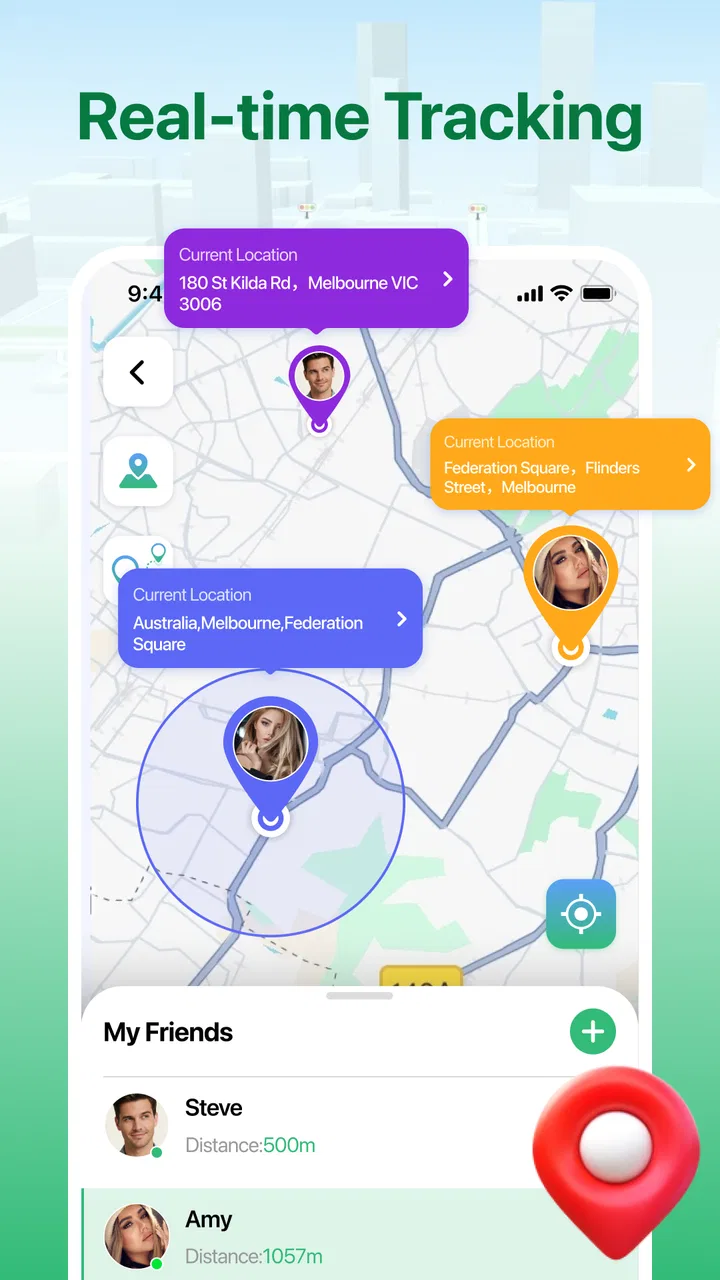
The most important capability here is high-precision real-time tracking. In plain language, that means the app is intended to show a current location instead of only recording where a phone was earlier. That distinction is valuable when timing matters. A previous location can tell you where someone started, while a live position helps you judge whether they are still moving, have stopped, or are close enough for you to meet them.
You May Also Like

 Blood Strike: 2.5 Anniversary
Blood Strike’s Loadouts Turn Every Drop Into a Tactical Gamble
A close look at Blood Strike’s custom loadouts: how fast access to signature weapons reshapes its battle royale rhythm, rewards preparation, and narrows the gap between fights.

 Pandora - Music & Podcasts
Pandora’s Music Is Easy to Start, but Harder to Recover
Pandora’s strength is its low-effort path from a seed to a station. Its weak spot is how much confidence it asks you to place in connection, setup, and quiet recovery.

 8 Ball Pool
 Is Built on Rivalries, Rematches, and Routine
A close look at the rivalries, rematches, shared routines, and unanswered safety questions that turn a quick pool match into a persistent mobile community.

 Samsung Music
’s Quiet Strength Is Playing What You Already Own
Its reach comes less from spectacle than from dependable access to a personal library. That simplicity is both the app’s strongest retention engine and its ceiling.

 AccuWeather: Weather Radar
AccuWeather Review: A Quick, Clear Forecast for Everyday Decisions
For everyday plans, the best forecast is the one you can understand quickly. AccuWeather makes rain timing, radar, and local conditions easy to act on, with a few trade-offs.

 Hill Climb Racing
Why Hill Climb Racing Still Turns Crashes Into One More Run
A tiny car, a bumpy hill and one more upgrade: Hill Climb Racing keeps resurfacing because its simple chaos makes every near-miss feel personal.
More From Our News Desk



I would not treat a map marker as a perfect substitute for direct communication. GPS accuracy can vary around tall buildings, indoors, underground, or wherever the phone has difficulty receiving a clear signal. A tracker can also reflect the phone’s position rather than the person’s position: if the handset is left in a bag, car, or home, the map will faithfully show the wrong practical answer. The useful mindset is to treat the location as a current indication that supports a conversation, not as an unquestionable verdict.
That nuance is especially important for families. The app can help answer a question such as “Are they still on the way?” without requiring repeated calls, but it should not become a reason to monitor someone secretly. I found the strongest use of this kind of tool comes from agreeing in advance when it will be used. A teenager might share their position while travelling home at night, or an adult family member might use it during a long journey. Clear expectations make the feature reassuring rather than intrusive.
The app’s store rating sits at a 4.2 average from around 1.6 thousand ratings, and it has passed half a million installs. Those figures suggest that the straightforward location-sharing idea has found an audience, but they do not remove the need to test it with the people and routes that matter to you. A tracker that works well near your home may behave differently on a crowded city street or inside a large building.
How I would set up a useful tracking routine
I recommend starting with a short, agreed test rather than immediately depending on the app during an important trip. Install the app on the relevant phone, open it before leaving, and check whether the displayed position makes sense while the person is standing still. Then compare it again after a short walk. This simple routine reveals more than reading a feature list because it tests the exact phone, route, and surroundings you will actually use.
Before someone leaves, make sure the phone has enough battery for the journey and is carried by the person rather than stored somewhere separate. It is also worth checking that the phone can obtain a location outdoors. If the marker remains stale or jumps around during the test, I would not use the app as the only safety plan. A normal call or message should remain available, particularly for children and older users.
One practical habit is to agree on a check-in point. For example, a family member can share their location while travelling and send a quick message when they arrive. The tracker then fills the gap between departure and arrival instead of creating pressure to watch a map continuously. This is a better workflow than leaving the app open all day and interpreting every pause as a problem.
Another useful habit is to read the map in context. A marker near a road does not necessarily mean the person is standing in traffic; it may indicate the nearest position the phone can calculate. Likewise, a brief lack of movement could mean a bus stop, a queue, a weak signal, or simply that the person has put the phone away. I prefer using the app to decide whether a call is sensible, not to replace common sense.
A realistic family journey
Imagine a university student travelling home after an evening class. They agree to share their live position during the walk from campus to the station. A parent checks once, sees that the phone is progressing along the expected route, and avoids interrupting with a call. Later, the marker appears to remain in one area longer than expected. Instead of assuming danger, the parent sends a message asking whether the student has reached the station. The location gives useful context, while the message confirms what the map cannot.
This is where the app feels most convincing to me. It reduces unnecessary checking when everything is normal, yet gives a family member a reason to make contact when the journey looks different from the plan. The value is not the map by itself; it is the combination of location context and a sensible human response.
The same approach can work for a relative driving to an unfamiliar appointment, although I would avoid encouraging anyone to interact with a phone while driving. The person can set things up before departure, and someone else can check the position from a safe place. For a child walking between two familiar locations, the app may provide reassurance during the journey, but an adult should still consider the child’s age, independence, and ability to contact help directly.
There is also a quieter use case: meeting someone in a crowded public place. If both people agree to share their location temporarily, it can be easier to find one another than to exchange descriptions of entrances and landmarks. Even here, the tracker is only as helpful as the phone’s signal and the person’s willingness to keep the device with them.
Where the experience has limits
The biggest trade-off is that real-time tracking depends on conditions outside the app’s control. A phone with a weak signal, low battery, poor satellite visibility, or an inconvenient indoor position may not provide the smooth, constantly updated view people imagine. “Real-time” should therefore be understood as the app’s purpose, not a guarantee that every map movement will appear instantly or with pinpoint certainty.
Privacy is the second major consideration. A location tracker can be useful between consenting adults, but the same capability can feel uncomfortable if someone is pressured to share continuously. I would only use it with clear agreement about who can see the location, when sharing begins, and when it ends. If a person is not comfortable with that arrangement, the right answer is not to persuade them harder; it is to choose a less intrusive way to check in.
There is also a social trade-off. Constant access to a map can encourage anxious checking. A parent may open the app repeatedly, even when there is no reason to worry, while the person carrying the phone may feel watched. Setting a specific travel window or using the app only for particular journeys creates a healthier boundary. In my view, this is one of the most important “advanced” ways to use the app: limit the habit, not just the technology.
I would also be cautious about treating this as a replacement for emergency services, a dedicated medical alert device, or a professional fleet system. A general phone tracker is appropriate for family coordination and ordinary travel awareness. It is not the tool I would choose when a situation requires guaranteed emergency response, specialist reporting, or formal records.
Compared with ordinary map apps, GPS Tracker & Location Tracker focuses more directly on the person you are trying to keep in view. A standard navigation app is usually better for finding a route, estimating travel time, or exploring nearby places. A messaging app may be more convenient when you only need to send a one-time location. This app makes more sense when the central question is where someone is now, rather than how to get somewhere.
That focus can also be its limitation. If your main need is driving directions, public transport planning, traffic information, or business navigation, a full navigation service will probably be the stronger choice. If you only share a location once every few weeks, a familiar messaging tool may involve less setup. I would choose this tracker when repeated, agreed location awareness is more important than a broad collection of map features.
Small decisions that make tracking more dependable
First, test the route at the time and place where you expect to rely on it. A sunny outdoor test does not prove that the same phone will report smoothly from a basement station or a dense apartment block. Second, decide what action a delayed marker should trigger. A message, a call, or waiting a few minutes may all be reasonable depending on the journey; immediately assuming the worst is rarely helpful.
Third, avoid sharing a device that is not consistently carried. A tracker attached to a family car may show where the car is, but that is not necessarily where the driver or passenger is. This distinction is easy to overlook and is one reason I would explain the setup to every person involved rather than silently relying on it.
Finally, keep the arrangement simple. If the user carrying the phone has to remember a complicated routine every time, they may forget to start tracking or may stop using the app. A short pre-trip check and an arrival message are easier to maintain than an expectation of permanent observation. The best workflow is the one people can follow without turning a normal journey into a technical task.
Who should use it and who should skip it
I see the greatest benefit for families who want a shared safety routine, couples coordinating travel, and friends meeting during a busy event. It is also a reasonable option for someone who wants a dedicated location-focused app rather than mixing that task into a messaging conversation. Because it is free, there is little financial barrier to trying it with a consenting group, though the real test is whether it behaves reliably on the phones and routes you use.
People who should skip it are those looking for advanced navigation, detailed travel planning, professional vehicle management, or a guaranteed emergency service. I would also advise against it for anyone who wants to monitor another person without their clear knowledge. The technology may show a position, but it cannot create trust, explain a delay, or replace a direct request for help.
For older relatives or less technical users, the app may be worthwhile if a family member helps establish the routine and explains what the location sharing means. The setup should be demonstrated calmly, with time to practise before an important trip. For children, an adult should make the decision based on maturity and safety needs, and should explain the arrangement rather than presenting it as invisible surveillance.
The app is free and rated for Everyone, which makes it approachable for a broad audience. Its release date is December 31, 2025, so I would still judge it by practical reliability on your own devices rather than assuming that a newer release automatically fits every situation. The developer, NAICOO PTE. LTD., has positioned it within Maps & Navigation, but its strongest identity is clearly the live location use case rather than general-purpose route planning.
My recommendation after using the core feature
GPS Tracker & Location Tracker is most useful when you want a simple answer to a simple question: where is this person right now, and should I contact them? Its real strength is the context it adds between departure and arrival. Used with consent, a tested route, a charged phone, and a backup way to communicate, it can make ordinary journeys feel less uncertain.
I would not install it expecting a perfect moving dot, a replacement for every map service, or a substitute for emergency support. Its limitations are tied to the phone, the environment, and the people using it. Those limits do not make the app pointless; they define the situations where it belongs.
My final view is positive for families and friends who can agree on sensible boundaries. Try it first on a short journey, decide how often you will check, and keep direct communication available. If that arrangement gives you reassurance without making anyone feel watched, the app earns its place as a focused location tool. If your needs are primarily directions or one-off location sharing, your usual navigation or messaging app will likely be the better fit.
FAQs for GPS Tracker & Location Tracker
01What features does the GPS Tracker & Location Tracker offer?
The GPS Tracker & Location Tracker app offers real-time location tracking, geofencing alerts, and historical route data. Users can set up safe zones to receive notifications when someone enters or leaves a designated area. The app also provides speed tracking and location sharing features, making it ideal for family safety and fleet management.
02Is the GPS Tracker & Location Tracker app secure and private?
Yes, the app prioritizes security and privacy by using encrypted data transmissions. Users have control over who can see their location and can easily turn off tracking when they want privacy. The app requires permissions only necessary for functionality, ensuring that your data remains protected.
03How accurate is the location tracking with this app?
The GPS Tracker & Location Tracker app provides highly accurate location data, typically within a few meters. Its precision depends on factors like GPS signal strength and network connectivity. The app uses a combination of GPS, Wi-Fi, and cellular data to provide the most accurate location updates possible.
04Does the app consume a lot of battery power?
While continuous GPS use can impact battery life, the app is optimized to minimize battery consumption. It uses intelligent algorithms to balance accuracy and power efficiency. Users can adjust settings to reduce battery usage, such as decreasing the frequency of location updates when not needed.
05Is the GPS Tracker & Location Tracker app compatible with all devices?
The app is compatible with most Android and iOS devices. It requires a smartphone or tablet with GPS capabilities and an internet connection. Make sure your device runs on iOS 11.0 or later, or Android 6.0 or higher, to ensure full functionality and access to the latest features.
Pros
- Highly accurate real-time tracking.
- User-friendly interface and design.
- Low battery consumption.
- Customizable alerts and notifications.
- Works in offline mode.
Cons
- Requires constant internet connection.
- Limited free features available.
- Occasional location glitches.
- Subscription model can be pricey.
- Privacy concerns with data sharing.

GPS Tracker & Location Tracker
Gallery